
End of the Day Syndrome

4/2/14

“Dr. S., my eyes are red and burning at the end of my work day.”

“Patient, what sort of work do you do?  Tell me something about your work conditions.”

“I am a computer graphics artist.  I sit and stare at my twenty-seven inch HD screen for hours on end gently adjusting the composition of each pixel.  My studio is air-conditioned but not humidified, so after some hours of work, I feel dry as a bone.”

“One more question…can you cry tears?  Say, when you peel and slice an onion?”
Rule of 20 - blinking

The need to blink

Blinking is a complex function of the eyelids that when completed results in a clean, refreshed, re-wetted corneal surface.  The tears that are washed across the outside of the eye with each blink bring oxygen and other nutrients to the outer cell layer aiding in the rebuilding and revitalizing of the surface tissue.

Blinking is characterized by a full sweep of the upper lid over the eye to meet the lower lid.  The completion of this motion is performed gently without squeezing.  And, to be effective full eye closure needs to be repeated fairly often.  Blink rates vary according to investigators but most sources report an average of between six and ten full blinks per minute under normal viewing circumstances.

The anti-blink problem of our generation

In olden times – say the years between 1750-1950 – the most aggravating problem to the ocular surface was a good book or intense study.  The reader would concern himself with the text at hand and slowly his eyes would dry until a “rest break” was necessary.

Environmental or vocational changes to our lifestyle over the generations have promoted reduced blink rates.  Most recently in this negatively developmental progression is the effect of the television screen, the CRT, the LED screen, the handheld and pocket computer on the blink rate.  It appears that as attention level increases, blinking suffers.  First the eyes close less, then incompletely, and finally rarely only when surface dryness drives the individual to desperate measures.  He must blink or (so he feels) his eyes will pop out of their sockets.

Adding insult to injury increasingly over the decades is air conditioning – both heating and cooling – when not humidified.  Staring at console screens in dry environs speeds the desiccation of the cornea and results in discomfort.

The surface of the eye is a biological system.  Living systems require some degree of moisture.  If the cells of the eye – or any biological surface — are permitted to dry out, they will die.  Dead corneal cells fall off the cornea and float in the tears on the surface of the eye until washed away with a blink.  Until the surface is cleaned the dead cells are considered by the eye to be foreign bodies with the consequent irritation and induced reflex to blink.

When cells die and fall off, the underlying nerve endings send pain signals to the nervous system.  The sensation can be felt as pain, burning, or mere irritation or itching depending upon the severity of cell loss.

How to handle environmentally induced dry eye

After the ocular surface is dry most treatments will seem to make matters worse:  to cause burning and stinging, perhaps, even more than the dry eye itself.  Any tear substitute, any amount of blinking will be irritating at first. But, that is really all that can be done at this stage:  wetting and blinking.

Prevention

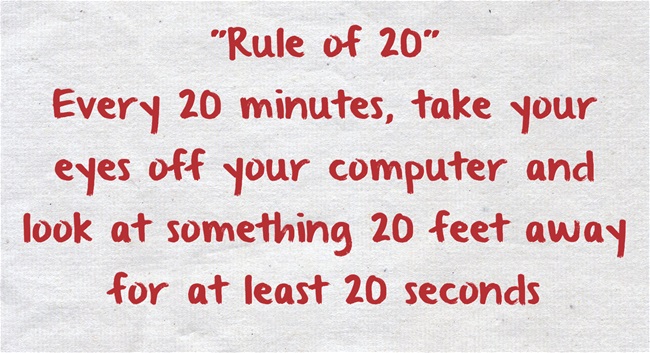
As in many conditions, the best treatment, in fact a cure, for recurrent environmentally induced dry eye is prevention.  For the eye that has a naturally flowing tear supply, the act of blinking is the surest prevention to stinging and burning after a day’s work at the computer.  Additionally, many sources recommend using the ‘rule of 20’:  after each twenty minutes of work, look up from the text or away from the screen; blink and refocus on the page twenty times.  This repetitive exercise simultaneously re-wets the eye and relaxes the focusing mechanism of the eye.

The result is relaxed and comfortable eyes that can continue to provide important and high quality information for longer hours of work.

Bezalel-SchendowichBezalel Schendowich, OD
Chairperson and Education Coordinator, JOS
Fellow, IACLE
Member, Medical Advisory Board NKCF
Sha’are Zedek Medical Center, Jerusalem, ISRAEL

Help for Computer Users

Working long hours in front of the computer requires a fairly unchanging body, head and eye position which can cause discomfort.  Correct working position, periodic stretch breaks, frequent eye blinking, artificial tears for lubrication are all very important.  However, it’s not always easy to remember this when you are engrossed in work. Here are a few fun, free and easy-to-install “break reminders” to help:

WorkSafe Sam - break reminder
WorkSafe Sam
WorkSafe Sam is a desktop tool that provides stretching tips to help reduce eye and muscle strain for office workers (clicking on this link will open a file on your computer because this is a zip file).

Workrave is break reminder program that alerts you to take “micro-pauses” and stretch breaks.

Take Your Break is another break reminder designed to prevent or minimize repetitive strain injury, computer eye strain and other computer related health problems.  It has a friendly interface and a tray icon status indicator.  It runs quietly in the background, monitoring your activity and reminding you to take regular breaks.

And remember to blink.  Blinking cleans the ocular surface of debris and flushes fresh tears over the ocular surface. Each blink brings nutrients to the eye surface structures keeping them healthy. The flow of tears is responsible for wetting the lower third of the cornea. This is very important in KC, since this area is generally below the bulge of the cone and in many cases irritated by wobbly RGP lenses.  Maybe your job requires hours of work at a computer. Maybe you like to spend your free time surfing the internet. Whatever the reason, your body is probably feeling the effects of spending too much time staring at a computer monitor, which could result in Computer Vision Syndrome (CVS).  The most common symptoms are: eye strain, dry or irritated eyes,redness in eyes,difficulty in refocusing eye,neck pain,double vision,blurred vision, fatigue, and headaches.

Please join us on Thursday when Dr. Bezalel Schendowich will be providing a detailed insight into the importance of blinking, going beyond computer usage.

CathyW headshotCathy Warren, RN
Executive Director
National Keratoconus Foundation

Is Omega-3 Important to Your Diet?

Last week a study that appeared in the Annals of Internal Medicine (AIM) showed that fish oils such as omega-3 don’t reduce the risk of heart disease.  It caused quite a stir, as we have been told for years, by organizations like the American Heart Association that we needed to increase our intake of omega-3.  For some people that meant taking supplements instead of eating flax seeds, walnuts, sardines or salmon, just a few of the sources of omega-3. omega-3 sources

In May of 2013 the results of the AREDS II study on eye supplements found that while lutein and zeaxanthin may be helpful in helping vision, omega-3 did not have a positive effect over five years.

In both of these studies they are referring to omega-3 supplements.  This does not mean you should give up eating fish, or other sources of omega-3.  To derive the benefits of omega-3 you need to get it from the source –  directly from the food you eat, so it is still advised you eat fish as part of a healthy diet.

If you do use supplements check with your doctor to make sure they are right for you.  A doctor can help you determine what, if anything you might need, making a decision based on your diet, medical history and any medications you might be taking.

If you want to learn more about dietary supplements, here is a fact sheet from the National Institute of Health.

Remember – supplements are what the name implies – something to supplement a well-rounded diet – they are not a substitution.

Susan DeRemerSusan DeRemer, CFRE
Vice President of Development
Discovery Eye Foundation

Better Lighting for Better Vision

Lighting is the most essential element for vision. Without light, we cannot see. Conversely, too much light causes glare and eye discomfort. People with macular degeneration, diabetic retinopathy, glaucoma, retinitis pigmentosa, and other vision conditions require specific levels and colors of light to maximize their vision. For each person, the lighting requirements are specific and one should consult with a low vision optometrist or ophthalmologist and find out the best color temperature of light, the best brightness of light, and the best type of light bulb to maximize vision.

There are many different forms of lighting for indoor use. The incandescent light bulb has been the most popular light bulb for decades but it will soon be discontinued because there are new light bulbs that use less energy, produce less heat, and produce a brighter light of different colors.

OTT task lamp - lighting
OTT task lamp

Compact Fluorescent Lights

The most frequent replacement for the incandescent light bulb is the compact fluorescent light bulb, sometimes abbreviated as CFL. The CFL bulb consists of a tube slighter larger than the diameter of a pencil that is swirled to produce a bulb approximately the same size as a conventional light bulb. The base of the bulb has threads to allow the bulb to be screwed into most all light fixtures and this will enable people to keep their older lamps.

LED Bulbs

Another common replacement for the incandescent light bulb is the LED bulb, also called the light emitting diode. LED bulbs are very efficient and use less energy that the CFL bulbs. There are many varieties of LED bulbs with various color temperatures. Although the price of an LED bulb is higher than the CFL, the overall cost savings makes them an excellent choice if your eyes respond best to the LED bulb.

How to shop for replacement bulbs
One of the easiest ways to purchase replacement light bulbs for your lamps at home is to go to a light bulb store or to a home improvement store. Take the information provided by your low vision eye doctor and ask a clerk to help you to find the bulb that you need. The following information is the features to search for on the package:

 Lumens: Lumens inform you about how much light the bulb will produce. The higher the lumens, the brighter the light.

 Temperature: The package of the bulb will describe the Kelvin temperature of the bulb. 2800 degrees will produce a white light with a reddish tint. 3500 degrees will be a whiter light while the 5000 degree bulb will be white with a tint of blue. Ask your doctor about the best temperature color because some bulbs with a temperature over 5000 degrees contain blue light which can be hazardous to the retina of some people’s eyes.

 Watts: The watts only tell you how much energy the bulb uses. The lower the wattage, the less energy it consumes.

 Base: A medium base is the standard base of the typical incandescent light.

Task Lighting

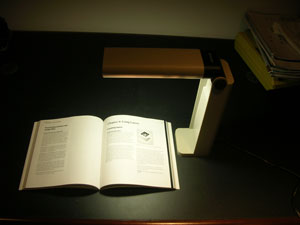
Task lights are designed to provide the recommended lighting for the specific activity that you are performing. A desk lamp is the most popular task light for reading, writing, paying bills, arts and crafts, and eating. The lamps are small and easy to move from one location to another. The table lamp has a cover that will direct the light from the light bulb directly on the items you want to see. This is very important because light will not shine into the eyes of the user and cause glare. Desk lamps are also positioned close to the table and this increases the amount of light that illuminates the item. The closer the light is to the reading material, the brighter the illumination. Too many times, people with low vision attempt to improve their lighting by installing a brighter bulb in the ceiling. However, the distance between the bulb and the reading materials is too large and one will not be able to see maximally.  Some of the most popular desk lamps for people with low vision are the Ott desk lamp and Veralux desk lamps. These lamps are very easy to turn on and off and they provide a wide area of illumination for reading and desk-work.

Track lighting
Track lighting
Some people require task lighting at different locations in the home, such as above the stove, kitchen counter, or in the living room. The most effective solutions for this type of task lighting are track lights. A track light consists of a metal strip that is mounted to the ceiling. Light fixtures can then be connected to the metal strip. Low voltage halogen light fixtures with a MR-16 bulb provide users with the largest variety of lighting needs. The MR-16 bulbs do not use much energy, they are available in different color temperatures, and they are very bright. Many people will install a track light above their lounge chair to read in the living room. Similarly, they can be installed over the stove or kitchen counter. The bulbs come in a spot light design and a flood design to spread the width of the light to a level that works best for the person. Track lights are very elegant and work very well in dining rooms and in conference rooms.

Bill Takeshita - July 2011Bill Takeshita, OD, FAAO, FCOVD
Chief of Optometry, Center for the Partially Sighted
Consulting director of low vision education, Braille Institute

10 Ways to Save Your Vision

More than half of the people responding to a 2012 survey from the American Optometric Association said they valued their eyesight more than their memory or ability to walk. In honor of Save Your Vision Month, here are some everyday things you can control to help “save your vision.”

© Tammy Mcallister - save your vision
© Tammy Mcallister | Dreamstime Stock Photos

 1. Enjoy a cup of tea – Green tea contains antioxidants, like vitamins C and E, lutein, and zeaxanthin that help protect against AMD and cataracts.  It is it hydrating, helping you produce tears.

 2. Take time to blink – On an average you blink about 15 – 20 times a minute. However, that rate drops by half when viewing text on a screen. Try using the 20/20/20 rule when staring at a screen: Every 20 minutes, look 20 feet away for 20 seconds so you can blink naturally and give your eyes time to relax.

 3. Wear sunglasses and a hat – Exposure to ultraviolet (UV) rays can deteriorate vision over time, leading to cataracts and age-related macular degeneration (AMD). The American Optometric Association recommends sunglasses that block at least 99 percent of UVA and UVB radiation and that screen out 75 – 90% of visible light. And if you plan to spend a lot of time outdoors, it’s a good idea to get sunglasses with lenses that are polarized, which means that they’ve been treated to reduce glare.  Since the sun doesn’t just affect your eyes from the front, try wearing a large brimmed hat to further protect your eyes.

4. Increase the seafood in your diet – Omega-3 fatty acids have been shown to bolster heart and brain health, as well as decrease your risk of eye disease. According to a study published in the 2011 Archives of Ophthalmology, women who ate canned tuna and dark-fish meat (mackerel, salmon, sardines, bluefish, swordfish) just once a week reduced their risk for AMD by 42%, as opposed to people that ate the same fish less than once a month.

 5. Eat a rainbow – Eating a full rainbow of fruits and vegetables regularly helps give your body the nutrients it needs.  In addition to fiber, vitamins and minerals, naturally colored foods contain what are known as phytochemicals, which are disease-fighting substances that also give fruits and vegetable their array of colors.  Star nutrients are lutein and zeaxanthin—pigments found in such foods as dark, leafy greens, broccoli, zucchini, peas, and Brussels sprouts. Also important are antioxidants found in red foods such as strawberries, cherries, red peppers and raspberries,  Orange foods have beta-carotene and include carrots, pumpkins, sweet potatoes and yams.

6. Use digital screens at a safe distance – The brightness and glare from computers, tablets, smartphones and televisions can lead to eyestrain after prolonged use. Recent studies have also shown ill-effects from the UV rays from these devices.  Symptoms can include headaches, blurred vision, dry or red eyes and difficulty refocusing. Experts recommend keeping the computer screen at least an arm’s length away and that you hold a handheld device at least 16 inches from your eyes.

 7. Contact lens solutions serve a purpose – While approximately 85% of contact lens wearers claim that they’re caring for their lenses properly, only 2% are according to a study out of Texas. The most harmful but common problem is moistening contacts with saliva instead of saline solution.

 8. Make-up makeover – Replace tubes of mascara after three months, as it is a breeding ground for bacteria. Sharpen liner pencils regularly and while it is okay to line the base of your lashes, using the liner inside the lash line can block oil glands. Replace eye shadows yearly and don’t share your eye cosmetics.

 9. Use protective goggles –   According to a 2008 study from the American Academy of Ophthalmology and the American Society of Ocular Trauma, of the 2.5 million eye injuries in the US annually, nearly half happen at home.  Sports activities are another cause of eye injuries, from contact sports to sports that use balls that could catch you unaware.  When snowboarding or skiing remember to protect your eyes from the sun and wind with tinted goggles that have UV protection.

 10. Have a yearly eye exam – Even if you don’t wear corrective lenses, adults should get a comprehensive eye exam (which includes dilating your pupils with drops) by age 40. After that a yearly eye exam is recommended to keep your eyes healthy and catch any changes in your eyes that may be indicators of eye disease.  If you have a family history of glaucoma or age-related macular degeneration, or you have diabetes, you are at a higher risk for vision-related issues and your doctor may elect to see you more often.  If you have symptoms such as persistent pain inside or behind your eyes, redness, or gradual loss of vision, make an appointment with your doctor immediately.

Susan DeRemerSusan DeRemer, CFRE